

Summary
- An Ethereum wallet is a digital combination of a wallet and keychain—it stores ETH and ERC-20 tokens and enables secure access to your cryptocurrencies on the Ethereum blockchain.
- The 40- to 44-character Ethereum wallet address is public and comparable to an IBAN.
- An Ethereum wallet does not store coins directly, but rather the private keys that give you access to your cryptocurrencies.
- There are five different types of Ethereum wallets: hardware wallets, mobile wallets, desktop wallets, paper wallets, and custodial wallets.
- Hardware Ethereum wallets involve purchase costs. In most cases, all other wallet types are free. However, transaction fees are usually incurred when using crypto wallets for ERC-20 tokens, and spreads or custody fees may also apply.
Explanation: What is an Ethereum wallet?
You can think of an Ethereum wallet as a digital keychain that allows you to securely store, send, and receive ETH (Ether). It can also provide access to other tokens based on the Ethereum blockchain, so-called ERC-20 tokens. These include, for example, UNI (Uniswap), MANA (Decentraland), and LINK (Chainlink).
The Ethereum wallet address
An Ethereum wallet address is the public part of your wallet and is comparable to an IBAN. It always begins with the prefix “0x” and consists of 40 to 44 characters (numbers and letters). This address can be used to send you ETH or other Ethereum tokens.
Are Ethereum coins stored in the Ethereum wallet?
It is important to understand that your Ethereum coins are not stored directly in the Ethereum wallet. Instead, the wallet does not store the cryptocurrencies themselves, but only the private keys that give you access to your ETH and allow you to authorize transactions.
What types of Ethereum wallets are there?
Below is a comparison of five different types of Ethereum wallets: hardware wallets, paper wallets, mobile wallets, desktop wallets, and custodial wallets:
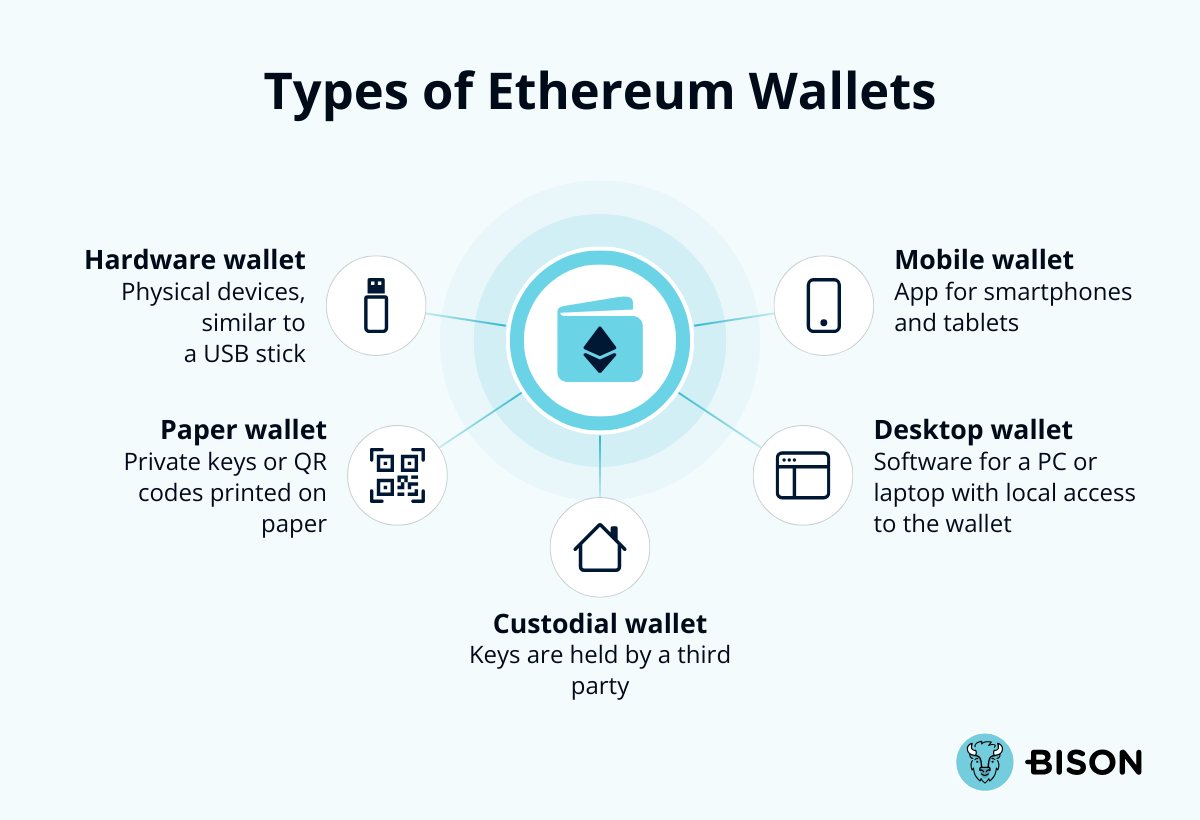
| Type of Ethereum wallet | Description | Advantages | Disadvantages | Examples / Providers |
|---|---|---|---|---|
| Hardware wallet | Physical devices, comparable to a USB stick | Very high security through offline storage; private keys remain on the device | Purchase costs; somewhat more cumbersome to use | Ledger, Trezor |
| Paper wallet* | Private keys or QR codes printed on paper | High security due to offline storage | Very high risk of loss; no password protection | You create it yourself |
| Mobile wallet | App for smartphones and tablets | Practical for on the go; fast access to ETH | Risk of losing the device | Trust Wallet, MetaMask Mobile |
| Desktop wallet | Software installed on a PC or laptop with local access to the wallet | More control than a mobile wallet; easy access from the PC | Security risks due to viruses or malware; risk if the device is compromised) | MetaMask Desktop, Exodus |
| Custodial wallet | A wallet where a third party takes custody of the private keys | No need to manage your own wallet; fast and secure with a regulated provider | Possible dependency on the provider | BISON (via Boerse Stuttgart Digital Custody) |
Important: Paper wallets are only considered a “wallet” in a figurative sense. Private keys or QR codes printed on paper are a clearly outdated method that we do not recommend.
Which is considered the most secure Ethereum wallet?
If you want the highest level of security, a hardware Ethereum wallet may be a good choice for you. Custodial wallets from regulated providers also offer a high level of security.
How can I create an Ethereum wallet?
Creating an Ethereum wallet depends on the type of wallet you choose. Custodial wallets such as BISON handle the setup automatically. With software wallets (including mobile and desktop wallets), you download an app or browser extension, create a new wallet, and securely back up your seed phrase. With hardware wallets, setup is completed directly on the purchased device, using the manufacturer’s app.
What fees and costs apply to Ethereum wallets?
Costs are only incurred when purchasing a hardware wallet. These typically range between 50 and 175 euros. Software such as MetaMask is generally free of charge. If you decide to open a BISON account, we also securely hold custody of your ERC-20 tokens free of charge. In addition, indirect costs may arise when using an Ethereum wallet in the form of various fees:
- Transaction fees (gas fees): Network fees are incurred for every transfer or interaction with smart contracts. These depend on the current utilization of the Ethereum blockchain.
- Hardware costs: Hardware wallets involve not only purchase costs; in some cases, additional fees for backups may also apply.
- Custody fees for custodial wallets: Some providers charge fees for the custody or transfer of cryptocurrencies. With BISON, custody is free of charge.
- Exchange-rate markups: When buying or selling coins via certain crypto wallets for ERC-20 tokens or platforms, spreads or trading fees may apply.
Network optimization: With some Ethereum wallets, transactions can be prioritized in exchange for a higher fee. However, these additional costs are always optional.
BISON as your free alternative to an ETH wallet
A comparison of ETH wallets shows that there are many available options. Since hardware wallets involve purchase costs and, like mobile and desktop wallets, require you to handle setup and management yourself, BISON takes care of these steps for you.
Once you create a BISON account, we securely hold custody of your ETH. In addition, you can access your cryptocurrencies at any time via the BISON app and web application.